
Sound Asleep Pro2.01 - Google Play
You'll be able to see results in few seconds.
Publisher Description


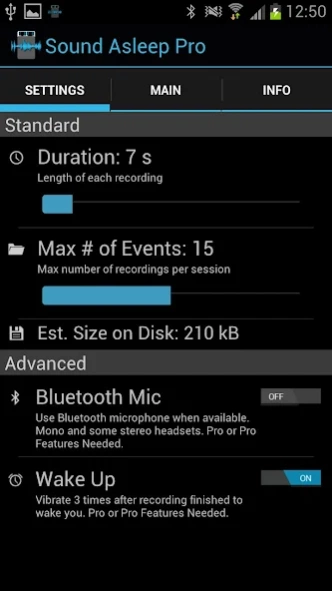
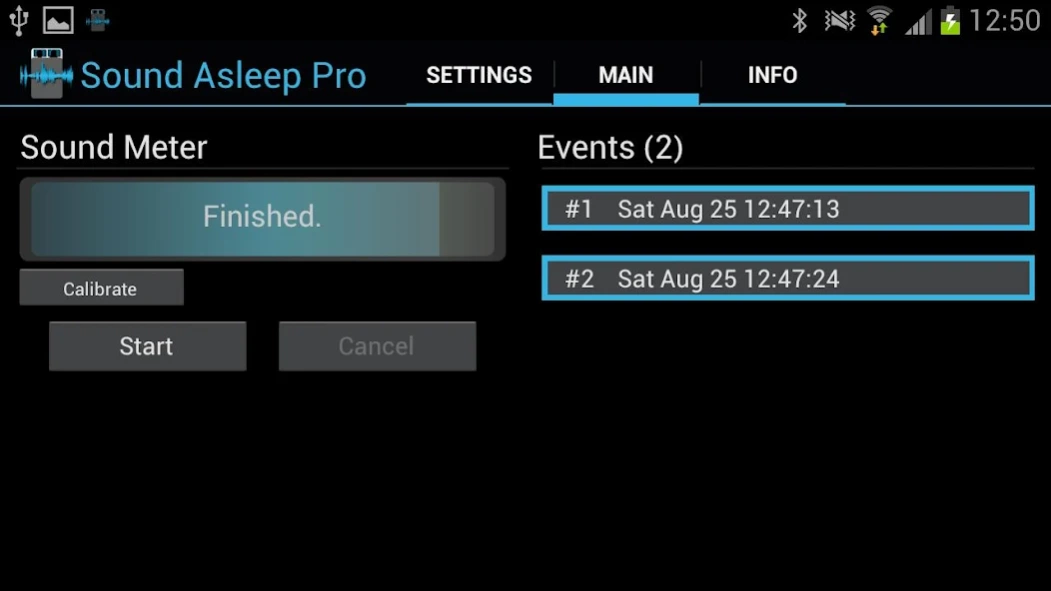
Find out if you snore or talk in your sleep! Record any loud noise at night
Pro Only Features:
-No Ads
-Support for both Portrait and Landscape Modes
-Can Record up to 30 Events (10 on free version)
-Each event can be up to 60 seconds (30s on free version)
Listens while you sleep for loud noises such as snoring, sleep talking, dogs barking, doors closing, windows breaking, etc. Starts recording after the loud noise for a set time. # of events to record is adjustable. In the morning playback the sounds and find out what happened last night. Each event has its time logged down.
Did you snore? Do you talk in your sleep? What was the dog barking at? What time did that happen? Was that in my dream or did it really happen?
Simply set the # of events to capture and the length of time for each. Calibrate for a suggested trigger level or select your own, then start the program and go to sleep.
Long press to save for later or share via email, bluetooth, etc.
This is my second app, please be gentle with the reviews. If something is not working, please email me and I'll try to get it working.
Thanks!
Permissions Needed:
Phone Calls: Read Phone status (shuts off the audio processing during calls)
Hardware Controls: Audio Settings, Record Audio (to use the microphone)
Write External Storage (to save sound files)
Coming Soon:
More Features
About Sound Asleep Pro
The company that develops Sound Asleep Pro is MarksThinkTank. The latest version released by its developer is 2.01.
To install Sound Asleep Pro on your Android device, just click the green Continue To App button above to start the installation process. The app is listed on our website since 2016-10-31 and was downloaded 0 times. We have already checked if the download link is safe, however for your own protection we recommend that you scan the downloaded app with your antivirus. Your antivirus may detect the Sound Asleep Pro as malware as malware if the download link to com.MarksThinkTank.SoundAsleepPro is broken.
How to install Sound Asleep Pro on your Android device:
- Click on the Continue To App button on our website. This will redirect you to Google Play.
- Once the Sound Asleep Pro is shown in the Google Play listing of your Android device, you can start its download and installation. Tap on the Install button located below the search bar and to the right of the app icon.
- A pop-up window with the permissions required by Sound Asleep Pro will be shown. Click on Accept to continue the process.
- Sound Asleep Pro will be downloaded onto your device, displaying a progress. Once the download completes, the installation will start and you'll get a notification after the installation is finished.
Program Details
System requirements
Download information
Pricing
Version History
version 2.01
posted on 2016-10-31
V2.01: Update under the hood to bring app up to date
V2.0: Huge Update!
New Swipeable tab layout
New sliders to adjust settings
New Bluetooth Mic Option (Pro or Pro Features Upgrade needed)
New Wake Up Option (Pro or Pro Features Upgrade needed)
New Upgrades Store
Bug Fixes
version 2.01
posted on 2016-11-01
V2.01: Update under the hood to bring app up to date
V2.0: Huge Update!
New Swipeable tab layout
New sliders to adjust settings
New Bluetooth Mic Option (Pro or Pro Features Upgrade needed)
New Wake Up Option (Pro or Pro Features Upgrade needed)
New Upgrades Store
Bug Fixes
version 2.0
posted on 2012-08-25
Several fixes and updates
Disclaimer
Official Google Play Link
We do not host Sound Asleep Pro on our servers. We did not scan it for viruses, adware, spyware or other type of malware. This app is hosted by Google and passed their terms and conditions to be listed there. We recommend caution when installing it.
The Google Play link for Sound Asleep Pro is provided to you by apps112.com without any warranties, representations or guarantees of any kind, so access it at your own risk.
If you have questions regarding this particular app contact the publisher directly. For questions about the functionalities of apps112.com contact us.
